
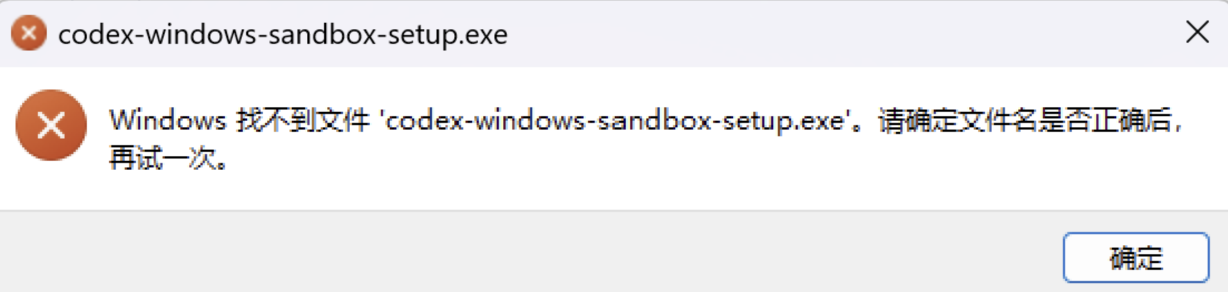
While I was editing this blog with Codex yesterday, the terminal and file-editing tools suddenly became unstable. Basic PowerShell commands sometimes worked, but operations requiring a restricted environment would fail or hang. Eventually, a more specific error appeared: Windows could not find codex-windows-sandbox-setup.exe.
This post records how I diagnosed the issue and the recovery method that worked on Windows.
Symptoms: the project and the terminal were not the real problem
It is easy to blame Hexo, PowerShell, or a network proxy at first. However, the actual behavior was inconsistent:
- Basic PowerShell commands worked.
- Normal file operations in the working directory worked.
- GitHub connectivity checks succeeded.
- Some Codex terminal sessions, patch applications, or sandbox checks failed.
The filename in the dialog is the important clue: codex-windows-sandbox-setup.exe. Codex uses this initialization program when preparing its sandbox environment on Windows. When the program cannot be found, the failure is in sandbox initialization, not in a particular blog project.
Cause: elevated Windows sandbox initialization did not complete
Codex has two sandbox implementations in a native Windows environment:
| Setting | Meaning |
|---|---|
elevated | Uses the privileged Windows sandbox initialization flow and is the recommended default. |
unelevated | Uses a compatible initialization and preflight flow that does not depend on a privilege-elevation helper. |
If the elevated initialization program cannot be found, privilege elevation fails, or its initialization environment is abnormal, Codex may be unable to create a restricted terminal. The “could not find codex-windows-sandbox-setup.exe” dialog is a clear signal of this class of problem.
The exact reason the initializer is unavailable could be an incomplete application update, a stale path, a permissions issue, or security software interference. The dialog alone cannot distinguish between them, so it is better not to immediately delete configuration, reset authentication, or modify project files.
Fix: switch to unelevated
Open Codex’s user configuration file:
C:\Users\your-username\.codex\config.tomlAdd or change the following setting:
[windows]
sandbox = "unelevated"
Save the file, then fully quit and reopen Codex. Closing only the current conversation or window may not reload the sandbox initializer.
After I made this change, terminal commands, file edits, the Hexo build, and the GitHub Pages deployment all returned to normal.
Does unelevated disable the sandbox?
No.
unelevated changes the underlying Windows sandbox initialization method; Codex still applies the current permission policy to file access and commands. It is useful when administrator privileges are unavailable or elevated initialization fails.
OpenAI’s Codex configuration documentation also notes that elevated is generally recommended on Windows, while unelevated can be used as a fallback when administrator access is unavailable or privileged initialization fails. Codex configuration reference
How to verify the recovery
After restarting Codex, run a few lightweight tests:
- Run a simple PowerShell command inside Codex, such as
Get-Location. - Ask Codex to create or modify a plain text file in the current working directory.
- Run the project build command, such as
npm.cmd run buildin the Hexo project.
If all three work, the sandbox flow needed for terminals, file writes, and project commands has most likely recovered.
Should you switch back to elevated?
There is no need to switch back immediately. If unelevated is stable, it is fine to keep using it. After a future Codex update, you can test whether the privileged sandbox has been fixed by changing the setting back to:
[windows]
sandbox = "elevated"
Restart Codex and test again. If the problem returns, switch back to unelevated.
It is also best to start your proxy software before Codex. However, a proxy connection issue is separate from the “sandbox initializer not found” error. Do not delete the .codex directory, modify auth.json, or remove existing proxy settings just to fix this error.
Loading comments...